

Valid For
- Volvo Chassis – All-new Volvo VNL
- Mack Chassis – Mack Pioneer, All-new Mack Anthem
The truck’s trailer detection system accomplishes detection via a brief pulse of compressed air through the red trailer supply line when the brake pedal is pressed. The system analyzes this pulse to determine whether or not the glad hand is connected to a trailer.
This pulse of air has been determined to inadvertently re-lock air-actuated tandem slide systems. The following procedure provides a means of navigating around the issues that the trailer detection system causes while attempting to slide the trailer tandems.
Procedure (Preferred Method)
- Connect to the trailer
- Charge the trailer air system (Press the RED trailer brake button)
- Once the trailer is fully charged and the air pressures stabilized, set all parking brakes
- Activate the trailer tandem slide (unlock)
- Enter the truck, close the door and fasten seat belt.
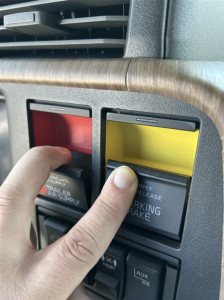
- Apply the brake pedal, press in the yellow Hand Control Unit (HCU) while pulling out the red HCU. This will release the trucks‘ parking brakes and keep the trailer brakes applied. (see picture below)
- Slide the tandems to desired position
- Apply both tractor and trailer parking brakes.
- Exit the truck and lock trailer tandem slide system
- Enter the truck, release all brakes, and continue route/task
Procedure (Alternative Method)
- Connect to the trailer
- Charge the trailer air system (Press the RED trailer brake button)
- Once the trailer is fully charged and the air pressures stabilized, set all parking brakes
- Exit the vehicle and remove the red glad-hand
- Activate the trailer tandem slide (unlock)
- Enter the truck, release the tractor brakes, and slide the trailer/set tandem position
- Exit the truck and lock trailer tandem slide system
- Reconnect the red glad-hand
- Enter the truck, release all brakes, and continue route/task